How to Use Raycast Snippets on Android
Export Raycast snippets and quick links as JSON, then import the parts that work on Android into Nibit.
If you use Raycast on a Mac and want the same saved text on Android, start with the parts of your library that travel well: snippets and URL-based quick links. Nibit imports those JSON exports into an Android second keyboard, so your usual keyboard can stay your usual keyboard.
Nibit is not Raycast, and it is not affiliated with Raycast. It is a separate Android app built for people who want the same kind of fast, keyboard-driven workflow on their phone.
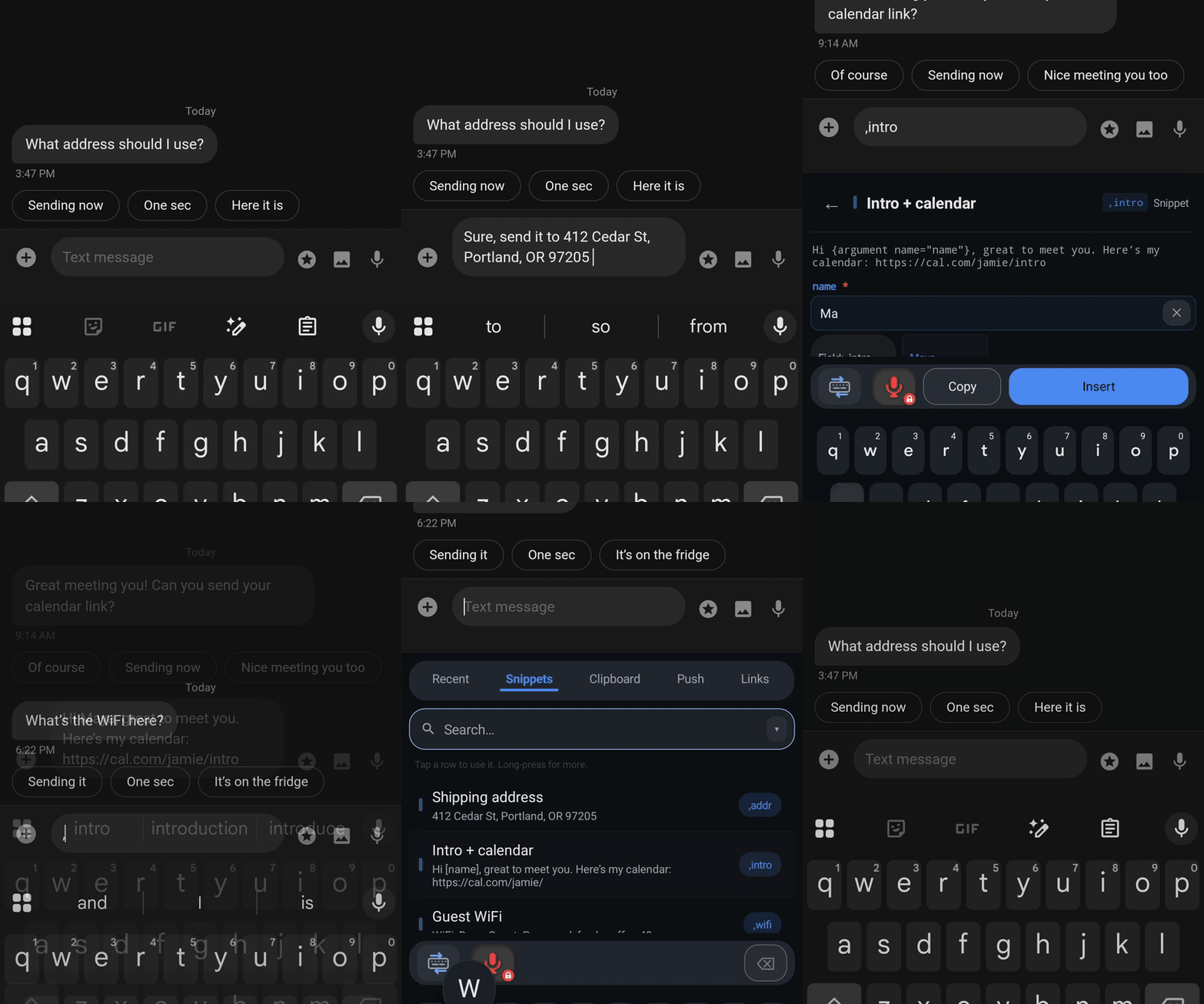
Why Raycast users land on Nibit
- The same placeholder syntax. Nibit uses the same dynamic placeholder format Raycast does. Your
{argument name="..."}snippets and dynamic templates work the way you expect. - Snippets and quick links, imported. Export your Raycast snippets and quick links as JSON, then import them into Nibit. No retyping.
- Three ways to fire a snippet. Type its trigger anywhere, switch to the Nibit keyboard and search your library, or open the app and tap it. The trigger is fastest when you remember it; the keyboard and the app are there when you don't.
- Useful without a subscription. Free includes unlimited snippets and quick links, built-in on-device transforms, and clipboard history with no ads.
How Nibit maps to Raycast on mobile
If you use Raycast on iOS, Nibit will feel familiar. Both put snippets, quick links, and AI in a keyboard you can reach inside any app.
| In Raycast | In Nibit |
|---|---|
| Snippets | Snippets, fired by a trigger you choose |
| Quick Links | Quick Links, with fill-in parameters |
| Dynamic placeholders | The same placeholder format |
| Clipboard history | Clipboard history with search and pinned items |
| AI commands on selected text | AI transforms on selected text |
| Custom keyboard, wherever you type | A second keyboard, wherever you type |
The big difference is the platform. Raycast's custom keyboard runs on iOS. Nibit is built for Android, alongside Gboard or whatever you type with now. The building blocks are familiar even though the home is different.
You pick the trigger for each snippet. It can be a word, an abbreviation, or a symbol prefix. Nibit suggests a , prefix because it is quick to reach on a standard Android keyboard and rarely collides with normal typing, but nothing is locked to it.
Bring your library over
You do not have to rebuild anything by hand.
1. Export from Raycast. In Raycast, run the Export Snippets command, then the Export Quicklinks command. Each one saves a JSON file to your computer. (These exports are not encrypted, so there is no passphrase to deal with.)
2. Install Nibit. Get it from Google Play and finish setup. Your normal keyboard stays as the default. Nibit runs alongside it.
3. Import into Nibit. Open Nibit, go to Settings, and find the Backup & data section. Tap Import, choose From file, and select your Raycast JSON. Do it once for snippets and once for quick links.
A few notes on the conversion. If your snippets use a custom trigger prefix like @ or !, Nibit detects it and offers to swap it for its suggested , prefix, which is easier to reach on a standard Android keyboard. You can keep your own prefix instead, or pick any trigger you like; the choice is yours. Quick links that point to web URLs come across as Quick Links; local path targets like ~/Downloads are skipped, since Nibit links are URL based. Most Raycast placeholders pass through unchanged because they already use Nibit's syntax. The import guide has the full mapping.
Cross-device, the Raycast way
Copying something on one device and needing it on another is a familiar annoyance, and Raycast users tend to expect a clean way to do it. Nibit's Push feature moves text, links, images, and files between your devices, end-to-end encrypted, and surfaces them in a Push tab right in the keyboard.
A Raycast extension to push straight from your Mac to your phone is built and waiting on Raycast's review. Until it is approved, you can use Push from the Nibit web companion at app.nibit.app and the Android app. We will update this page when the extension goes live.
What else you get
Snippets and quick links are the starting point. Nibit also includes:
- Clipboard history. A searchable history of what you copy, with links, emails, and phone numbers surfaced as chips.
- AI transforms. Select text in any app to fix grammar, change tone, translate, or summarize. The non-AI transforms like case changes, trimming, and JSON formatting are free; the AI-powered ones are part of Cloud Pro.
- Smart dictation. Voice input that strips filler words and self-corrections.
- Web companion. Manage your whole library from a browser at app.nibit.app, with sync on Cloud Pro.
Pricing
| Nibit Free | Nibit Cloud Pro | |
|---|---|---|
| Price | Free | $5.99/mo · $59/yr |
| Snippets | Unlimited | Unlimited |
| Quick links | Unlimited | Unlimited |
| Ads | None | None |
| Clipboard history | 500 items, unlimited retention | 500 items, unlimited retention |
| Built-in transforms and placeholders | Included | Included |
| Hosted AI, Push, sync, and web dashboard | — | Included |